Blender 5.2 LTS: New Features and Production Improvements
Blender 5.2 LTS adds experimental procedural physics, remote asset libraries, a more memory-efficient Cycles texture workflow, refreshed Grease Pencil tools, and production-focused improvements.
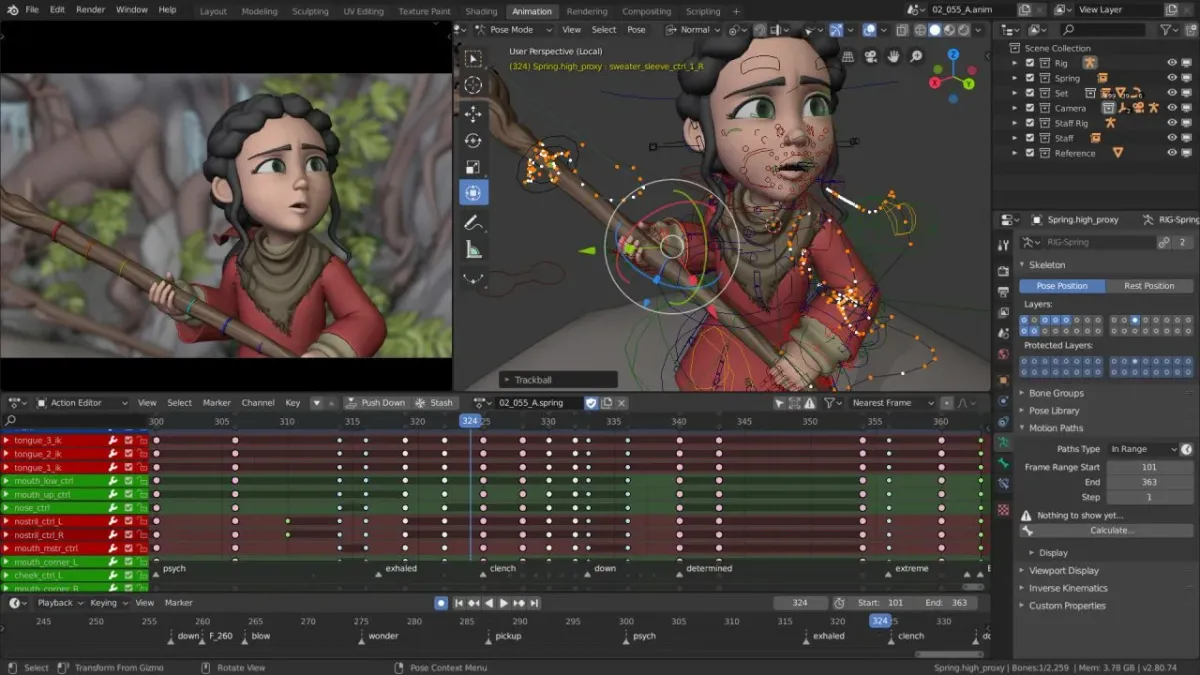
Blender is a free and open-source 3D creation suite for modeling, sculpting, texturing, animation, rendering, compositing, visual effects, and video editing. Its integrated toolset supports projects ranging from product visualization and game assets to animated films and complex procedural scenes.
On July 14, 2026, the Blender Foundation released Blender 5.2 LTS, introducing experimental procedural physics, remotely hosted asset libraries, rendering improvements, and updates to Geometry Nodes, Grease Pencil, the compositor, and EEVEE. The release receives long-term support until July 2028.
As of October 14, 2026, the latest maintenance release in this series is Blender 5.2.2 LTS, released on September 15, 2026. It includes bug fixes affecting Geometry Nodes, Grease Pencil, the compositor, and the Video Sequencer, making it the recommended starting point for new installations that require the stable 5.2 release line.
What Is Blender?
Blender combines a wide range of creative tools in one application, allowing users to create, animate, and render 3D scenes without relying on separate programs for every stage of production.
Its main capabilities include:
- 3D modeling and sculpting: Create characters, objects, environments, and detailed assets.
- Materials and texturing: Build surfaces using image textures, procedural techniques, and node-based shaders.
- Rendering: Produce images and animations with Cycles path tracing or the real-time EEVEE engine.
- Animation and rigging: Animate characters, objects, cameras, and procedural systems.
- Geometry Nodes: Create reusable procedural workflows for generating and modifying geometry.
- Grease Pencil: Combine 2D drawing and animation with a 3D environment.
- Compositing and visual effects: Process rendered images and build node-based effects.
- Video editing: Assemble footage, audio, transitions, and effects in the Video Sequencer.
- Python scripting: Automate tasks and develop custom tools and production pipelines.
Blender runs on Windows, macOS, and Linux. Its broad feature set makes it suitable for independent creators, professional artists, technical directors, educators, and production teams.
What's New in Blender 5.2 LTS
Experimental Procedural Physics
Blender 5.2 introduces experimental hair and cloth physics workflows built around Geometry Nodes. These tools provide controls for behaviors such as stretching, bending, pinning, and tearing in cloth simulations, while hair dynamics allows hair to respond to simulated movement.
The release also expands Geometry Nodes with Geometry Bundles, Lists, and additional tools for managing data and attributes. A new Sample Sound Frequencies node can analyze audio frequency ranges and amplitudes, enabling sound-driven procedural animations and simulations.
These additions give technical artists more flexibility when building reusable systems and complex effects. However, the physics systems remain experimental and should be tested carefully before being adopted in critical production pipelines.
Remote Asset Libraries
Blender 5.2 supports remotely hosted asset libraries, allowing users to access reusable assets over the internet instead of keeping every library on their local machine.
The system supports custom libraries hosted by studios, teams, and individual creators. Blender's online Essentials library also provides additional materials, brushes, procedural setups, and other resources on demand.
To use online assets, users must enable Allow Internet Access in Blender's preferences. Local assets and ordinary offline workflows remain available without this feature.
Remote libraries can simplify collaboration and asset distribution, although they require appropriate network access and attention to asset licensing and maintenance.
Cycles Texture Cache
Rendering scenes with many high-resolution textures can consume considerable memory. Blender 5.2 introduces a texture cache for Cycles to help reduce memory usage and improve startup performance in texture-heavy projects.
When enabled, Blender generates optimized .tx texture files in a blender_tx directory alongside the source images. Cached data is updated when the corresponding image changes.
Users can enable the feature under Render Properties → Performance → Texture Cache by selecting Auto Generate.
The benefits depend on the scene: projects containing many large textures may benefit more than those limited primarily by geometry or other resources. The cache also requires additional disk space, so its impact should be evaluated against the workload.
Rendering and Shader Improvements
Blender 5.2 brings improvements to both Cycles and EEVEE.
Cycles adds a Thin Wall option to the Principled BSDF shader. This treats a surface as a thin sheet, helping represent materials such as films, leaves, and thin transparent or translucent surfaces.
Color management also gains reorganized color-space menus and additional input color spaces for professional camera workflows. A new Time node expands the tools available for time-dependent shader setups.
EEVEE receives a substantial overhaul of its screen-space ray-tracing pipeline, addressing longstanding usability issues and improving rendering consistency. Some older scenes may require adjustments to thickness settings, and changes to energy conservation can make certain renders appear darker.
Users maintaining established projects should compare representative renders before upgrading, particularly when visual consistency is important.
Grease Pencil Improvements
Grease Pencil introduces a new Delaunay-based fill algorithm that generates geometry from boundary strokes. It supports automatic gap detection and inverse filling, produces results independent of viewport zoom, and can be considerably faster than the previous pixel-based approach.
The existing flood-fill algorithm remains available through the advanced tool settings.
Line materials also gain improved placement controls for dots and squares, including distribution by count, density, or radius. Additional settings allow artists to vary size, opacity, and color, while updated brush assets expand the available drawing options.
These changes benefit 2D animation, storyboarding, motion graphics, and stylized 3D projects.
Sculpting and Attribute Preservation
Blender 5.2 adds the Scene Project brush, which projects sculpted vertices toward surfaces of other objects. Primitive-creation tools are also available directly in Sculpt Mode, reducing the need to switch between modeling and sculpting workflows.
The voxel remesher now interpolates vertex and corner attributes rather than simply copying values from the nearest original point. This improves the preservation of vertex colors and other mesh data during repeated remeshing.
For sculptors and character artists, these improvements help maintain painted details while refining complex geometry.
Compositor and Video Sequencer
The Compositor gains new node types and support for additional data, including strings, fonts, matrices, rotations, and integer vectors. Blender 5.2 also adds new nodes, improves interactive responsiveness, and expands gizmo functionality in the Image Editor.
The Video Sequencer introduces a compositor-based effect strip, allowing compositor node trees to be used directly on the editing timeline. Compositor modifiers and effects can also use GPU acceleration, which may improve performance for demanding effects depending on the hardware and node setup.
Together, these changes make it easier to combine 3D rendering, image processing, and video editing in a single application.
VR Location Scouting
Blender's VR Scene Inspection tools include Location Scouting features for reviewing scenes in virtual reality. Users can capture viewpoints, adjust camera settings through a virtual viewfinder, and convert captured shots into scene cameras or markers.
This specialized workflow can help with architectural visualization, environment design, and camera planning.
Blender 5.2.2 LTS: Maintenance Updates
The initial Blender 5.2.0 release introduced the new feature set, while subsequent 5.2.x releases have focused on fixes and refinements.
Blender 5.2.2 LTS, released on September 15, 2026, includes fixes affecting Geometry Nodes, Grease Pencil, compositor assets, and Video Sequencer operations, among other areas.
The distinction between the initial release and the latest maintenance version matters when evaluating new features or updating an existing installation. The major capabilities described in this article belong to the 5.2 series, while the 5.2.2 changelog documents fixes specific to that maintenance release.
The LTS designation means the series is scheduled to receive support until July 2028. This makes it relevant to studios, freelancers, and teams maintaining projects over extended periods.
For production work, the stable 5.2.2 release is preferable to experimental development builds. Users should still test important projects, add-ons, scripts, and rendering output before deploying updates.
Compatibility and Practical Considerations
Before upgrading an established Blender installation:
- Test important
.blendfiles and compare rendered output. - Check third-party add-ons, Python scripts, and pipeline integrations for compatibility.
- Review relevant release notes if your workflow depends on Geometry Nodes, Grease Pencil, or specialized rendering features.
- Back up projects before opening and saving them in a newer version.
- Evaluate experimental hair and cloth physics before relying on them in critical production work.
Rendering performance and available GPU features depend on hardware and supported backends. Complex scenes and established production pipelines should be tested before an update is rolled out across a team.
Licensing and Commercial Use
Blender is free and open-source software distributed under the GNU General Public License. It can be used for personal, educational, professional, and commercial projects, subject to the applicable license terms.
The software license does not automatically apply to every third-party add-on, texture, model, or other asset. Users should check the licensing conditions of external resources before incorporating them into their work.
The Blender Foundation also distinguishes the software license from the rights associated with artwork created using Blender. Users retain rights to their own creations, subject to any other obligations that may apply.
Who Should Consider Blender 5.2 LTS?
Blender 5.2 LTS is particularly relevant to:
- 3D artists and modelers seeking an integrated modeling, sculpting, and rendering environment.
- Animation and VFX teams that need a maintained release series for longer projects.
- Technical artists building procedural workflows with Geometry Nodes and Python.
- 2D animators and illustrators working with Grease Pencil.
- Motion designers and video editors combining 3D scenes, compositing, and editing.
- Educators and independent creators looking for a capable creative suite without proprietary software licensing fees.
Users with older add-ons or highly customized production pipelines should verify compatibility before upgrading. Experimental physics features also require additional testing before they can be relied upon in demanding projects.
Final Thoughts
Blender 5.2 LTS combines new procedural capabilities with practical improvements to rendering, sculpting, Grease Pencil, compositing, and asset management. Experimental hair and cloth physics expand Geometry Nodes workflows, while the Cycles texture cache targets memory pressure in scenes with many high-resolution textures. Remote asset libraries and Video Sequencer improvements further strengthen Blender's integrated production workflow.
With support scheduled through July 2028, the 5.2 series provides a maintained foundation for projects that prioritize stability. As of October 14, 2026, Blender 5.2.2 LTS is the latest maintenance release in the series. Users should test project compatibility, extensions, and rendering results before updating established production environments.
Official Resources
Official Website: Blender
Official Announcement: Blender 5.2 LTS Release
Download: Download Blender
Release Notes: Blender 5.2 Release Notes
Version History: Blender 5.2 LTS Releases
User Manual: Blender 5.2 Reference Manual
Source Code: Blender Repository
License: Blender License

Comments ()