Published
- 6 min read
GhostBSD: A Beginner-Friendly Desktop Built on FreeBSD
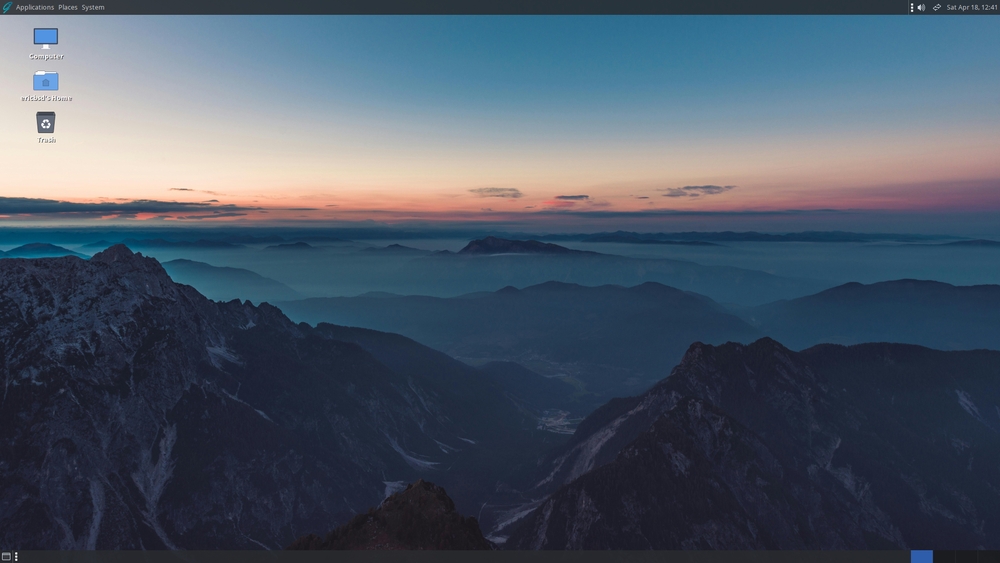
If you have only used Linux, GhostBSD will feel like a familiar stranger. You get a graphical desktop, a live USB session, a point-and-click installer and a graphical software manager - but underneath runs FreeBSD, an operating system from an entirely different family than Linux. The project describes itself as a simple, elegant desktop BSD operating system, and that is a fair summary. GhostBSD takes a system famous for powering servers and file storage and turns it into something you can install on a home laptop in fifteen minutes.
What Is GhostBSD?
GhostBSD began in 2010, when developer Eric Turgeon set out to give FreeBSD a proper desktop edition. The first release appeared in March 2010, and the project has been updated continuously ever since. The current release, 26.3, is built on FreeBSD 15.1 and comes as an image for 64-bit (amd64) machines.
Two details set the tone of the project. First, the default desktop is MATE, a classic layout with a taskbar, a menu and a system tray, kept light on resources. A community edition with Xfce is also available. Second, the core of the system is distributed under the BSD 2-clause license, one of the most permissive licenses in the software world.
Why Not Just Use Linux?
FreeBSD is not a Linux distribution, and it does not try to be one. It has its own kernel, its own drivers and its own userland tools, all developed together as one base system. Everything you install afterwards sits on top of that base as a separate layer.
Compared with a beginner-friendly Linux distribution such as Ubuntu or Mint, the difference shows up in daily use in a few places:
- Updates do not interfere with applications. The FreeBSD base is updated as a single unit, separately from installed programs.
- Configuration stays readable. Services start through plain rc.d scripts instead of systemd, and system settings live in text files under /etc.
- ZFS is a first-class citizen. The installer can set up a ZFS root filesystem with compression and snapshots, a feature desktop Linux still handles awkwardly.
- One lineage, not one thousand. There are no competing forks to choose between; GhostBSD simply tracks FreeBSD releases.
The MATE Desktop
Boot the image and you land in a clean MATE desktop: applications menu, window list, clock, tray. Nothing hides the fact that this is FreeBSD - a terminal is one click away - but nothing forces you to open it either. Firefox comes preinstalled as the browser, along with an archive manager, a text editor and media tools, so the system is usable straight after installation.
Installing Software
Software Station is the graphical package manager and the main way to add programs. You search by name, press Install, and it fetches the package from the FreeBSD repositories with pkg underneath. Those repositories carry more than 30,000 packages: LibreOffice, GIMP, VLC, Thunderbird, Chromium and Visual Studio Code are all there under the same names Linux users know.
If you ever want to compile software with custom options, the FreeBSD ports tree is available too, but most desktop users will never touch it. The project documentation explains both approaches with examples.
Keeping the System Updated
Updates go through Update Station, a small application that checks for new versions on its own. It handles both package updates and base system upgrades, including major version jumps. For anyone arriving from Linux, this is the closest thing to a distro’s update manager, and it removes most of the command-line work people associate with BSD.
System Requirements
The official download page lists modest hardware requirements, and any computer from the last eight years will pass:
- 64-bit (amd64) processor
- 8 GB of RAM minimum
- 15 GB of free disk space
- A network connection during installation
In practice, lighter machines with 4 GB of RAM can still run MATE, but the official figure assumes a comfortable desktop with a modern browser open.
How to Install GhostBSD
The installation flow is deliberately short and takes about fifteen minutes on modern hardware:
- Write the downloaded ISO to a USB drive of 8 GB or larger.
- Boot the machine from the USB stick. The image starts as a live system, so you can test hardware before installing anything.
- Launch the installer from the live desktop and answer a short list of questions: language, keyboard, disk.
- Choose ZFS or UFS for the root filesystem - ZFS is the recommended default.
- Create a user, set a password, and let the installer copy the system.
- Reboot, remove the USB stick, and log in to the installed desktop.
After the first login, open Update Station and apply any pending updates before installing software.
Hardware Support
Hardware support matches FreeBSD, which is strong in some areas and limited in others. Intel and AMD graphics work with open-source drivers, and NVIDIA cards have a proprietary driver available as a package. Wired Ethernet rarely causes problems. Wireless depends on the chip: many Intel cards work out of the box, while some Broadcom and Realtek chips need extra configuration. Checking the FreeBSD hardware notes before installing on a laptop saves frustration.
Who Should Try It?
GhostBSD fits several types of users:
- The curious. You want to see what BSD is like without reading a handbook before the first boot.
- Coming from macOS. macOS is built on UNIX, and MATE with a terminal feels familiar without Apple’s restrictions.
- People tired of distro churn. One coherent base system changes little between releases, and updates do not rearrange your setup.
- Anyone who wants ZFS on a desktop - snapshots and compression without setting up a server first.
One practical tip after installation: protect the files that matter. The FossCrypt tool (/fosscrypt/) on this site encrypts single files on any system with OpenSSL, and once you start filling the system with software, Beta Radar (/beta-radar/) tracks beta releases of popular open-source tools.
The Bottom Line
GhostBSD does one job well: it removes the barrier between ordinary users and FreeBSD. You get a desktop that installs in minutes, a software manager that works like the ones on Linux, and underneath, an operating system with a reputation for stability earned over decades. If you have ever wanted to see what the other side of free UNIX looks like, this is the easiest way to do it.
Download: GhostBSD 26.3 MATE 64-bit | GhostBSD 26.3 Xfce 64-bit | Torrent (Open Source)
Links: GhostBSD Home Page | Documentation Portal | FAQ | Release News | GitHub | FreeBSD Handbook